Pre-drill screw and wire holes on channel letter backs
In short: NestSigns Pre-drill places 0.25 in screw holes and 0.5 in wire holes on channel letter backs, lined up across the sign, ready to cut.
NestSigns Pre-drill places screw and wire holes on channel letter backs for you, so the backs come off the router already drilled. It is for signs mounted straight to the wall, without a raceway, where every back needs mounting screws and a hole for the wires.
Start free: 20 nesting runs, no credit card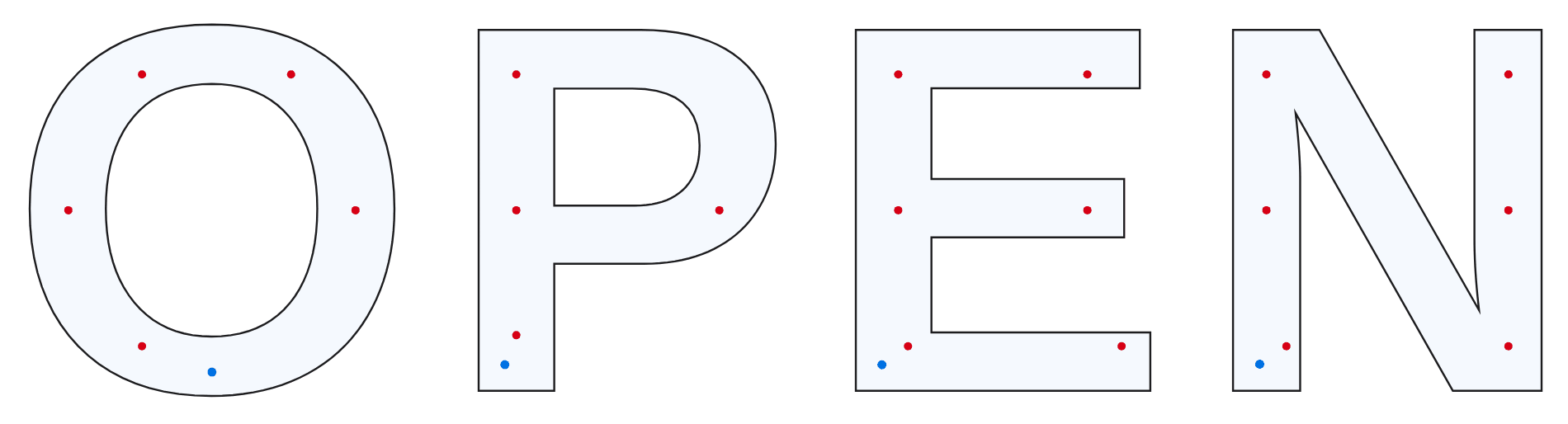
Where the holes go
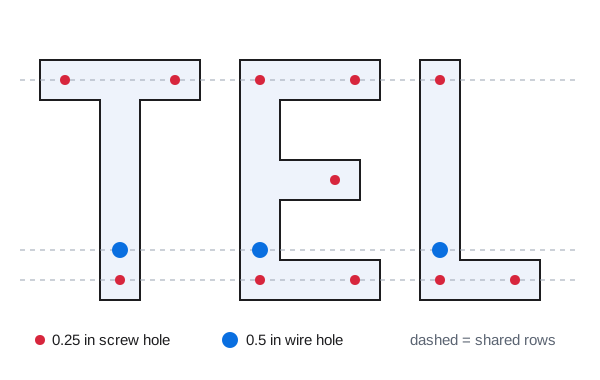
- Screw holes: 0.25 in. Ideally about 2.5 in from the letter edge, never closer than 0.75 in; thin strokes can go to 0.5 in. Every stroke end gets one.
- Wire holes: 0.5 in, at the bottom of each letter, about 2 in from the edge when the stroke is wide enough, and at least 1.75 in from a screw hole.
- Lined up: holes across a row of letters share the same few lines, and the wire holes sit at one height.
- Small letters get at most 4 holes; letters under 2.5 in tall are marked "too small".
Check and adjust
Drag a hole, add one, delete one, or select several and move them together; undo works on every step. A hole too close to the edge gets a red ring, and Auto fix moves it to a safe spot. Mirror the layout when you cut the back from the reverse side.
From holes to cut
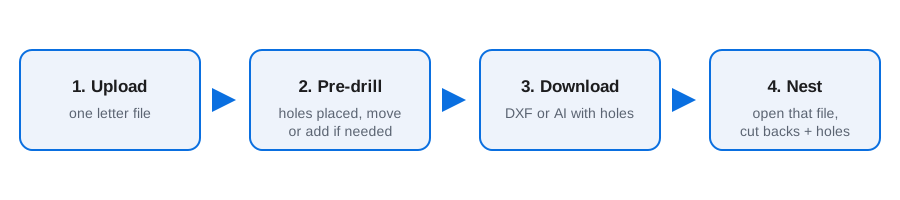
Download the pre-drilled DXF or AI first, then open that file in Nest. The holes travel with each back, so the backs are drilled and cut in the same job (see channel letter nesting and nesting ACM letter backs). The last 10 Pre-drill jobs stay in your archive.
What else it does for letter jobs
- True-shape nesting by the real letter outlines: any angle, 0/180° only, or no rotation.
- Exact spacing. Type the gap or your bit diameter; every layout is checked and shows the smallest gap measured.
- Parts inside letter holes. Small pieces go inside O, A, B and D, and holes stay with their letter.
- Leftovers first. Full sheets and leftover pieces per material, smallest leftovers used first, stock updated when the job is done.
- Oversize letters left out, divided, or divided with a 1 in joining strip, pieces labeled A1, A2…
- Every part numbered on the sheets and on the original artwork in the layout summary PDF.
- Pre-drill holes for channel letter backs: 0.25 in screw holes and 0.5 in wire holes placed and lined up for you (how Pre-drill works).
Questions
Is Pre-drill included in the free trial?
Yes. Pre-drill is part of NestSigns; any signed-in account can open it from the Pre-drill button at the top left of the nesting page.
Can I open several files at once?
No. Pre-drill works on one letter file at a time. Download its result, then open the next file.
Which hole sizes does it use?
0.25 in screw holes and 0.5 in wire holes. You can move, add or delete any hole before you download.
NestSigns at a glance
| Opens | Adobe Illustrator (.ai), PDF, DXF, SVG, CorelDRAW (.cdr X4 and newer) |
|---|---|
| Exports | DXF, PDF, AI, SVG, LightBurn (.lbrn2), plus a numbered layout summary PDF |
| Units | Inches by default, centimeters optional |
| Nesting | True shape, parts inside letter holes, exact spacing checked on every sheet |
| Material | Any sheet size, leftovers kept in stock and used first |
| Pre-drill | Screw and wire holes for channel letter backs, downloaded as DXF or AI |
| Runs on | Web browser on Windows or Mac, no install |
| Price | 20 free nesting runs, no credit card; then $14.99 per month (paid plan opens soon) |
Start free
More: All features · NestSigns for your machine and software · FAQ